Terraform Drift Detection
Technology and engineering is an ever changing landscape with new technologies, methodologies and best practices appearing and being refined as time goes on. One key practice that has become a core requirement within Cloud Engineering especially is understanding of Infrastructure as Code (IaC) and within that space, Terraform, in part thanks to its library of providers that allows it to be used across all major clouds and even on-prem systems, has become a top choice across the industry with more and more businesses embracing it for their infrastructure automation. One pressing issue that teams come across when using IaC, especially in their infancy of utilising it is infrastructure drift which is a challenge that brings drift detection to the forefront of the minds of many teams.
Drift occurs when your live infrastructure deviates from what has been defined in your Terraform files and can occur for various reasons, the most common being a change that has happened outside of Terraform’s purview, for example, changes made via AZ CLI or via “click-ops” within the portal itself, all of which causes a mismatch from the state file that is managed by Terraform. By setting up drift detection, you will be able to identify these mismatches, provide a fix and ensure that your state is up to date so that if needed, all resources can be recovered if something was to go wrong.
Drift within Terraform occurs when there is a real-time difference between the details of the resources that has either been created or is being managed by Terraform and the infrastructure itself. The drift can be something as simple as a resource has been given an additional tag or something more complex like RBAC settings have been overhauled. The benefit that Terraform has over other IaC like BICEP is that because it creates and manages its state file, it is able to pinpoint any alterations that has been made outside of Terraform to the infrastructure as well as modifications to the Terraform configuration. To facilitate seeing these differences you can run the command terraform plan which creates a new, temporary state file in memory and compares it to the existing state within your infrastructure. The output of the command shows the changes between the actual state and the desired state.
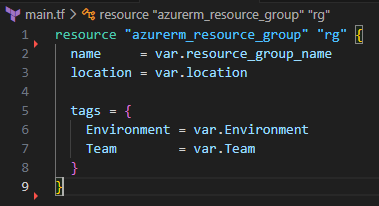
Lets look at this very simple piece of Terraform to create a resource group and tag it with 2 key-value pairs.
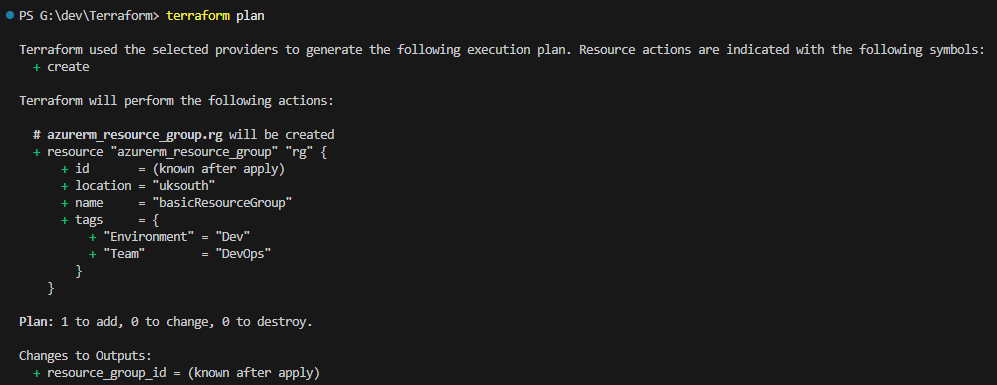
As you can see below, with running the plan command, it is creating a new resource group named basicResourceGroup and giving it 2 tags, one named Environment and the other named Team with values.
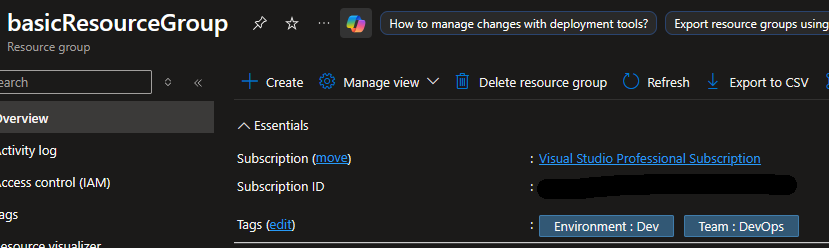
Once you run terraform apply, you can see that it has successfully been added in the portal. At this point, the state file that Terraform manages matches the managed infrastructure in Azure so if I run a terraform plan command again, it will tell me that there are no changes.
Now, if I go and change the value of the Environment tag from Dev to Development via the portal, this is a “click-ops” change which means that Terraform was not aware of it and therefore its state file will not match as you can see when we run a new plan command.
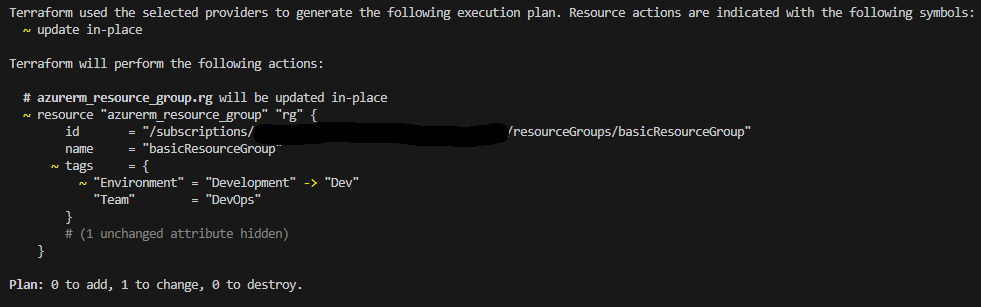
Terraform has captured what the drift is between the infrastructure and its state file and has told us that there is 1 resource that needs to be changed, this is the response to a resource that has drifted from the known state but can be a deeper cause then just manual changes, it can be a deeper systematic or cultural cause that needs to be looked at for example:
- Insufficient training when IaC is in it’s infancy or new teams are given access and permissions to create/modify/delete cloud resources.
- Urgent hotfix which in an out of hours situation where you might not have an additional approver for the pipeline is okay but once the situation is resolved, the code should be updated to reflect the changes.
- Lack of automation or use of 3rd party automation. Without utilising repeatable pipeline deployments, you can run the risk of drift, especially if using a 3rd party tool to deploy or modify resources as it might not utilise Terraform or give you the option to connect it to your state file causing drift when it is used.
Now we have covered what drift is, potential situations that can cause drift, its time to talk about why we care about it.
Manual changes can have a financial implication, imagine you have deployed a virtual machine on the D2as_v5 SKU and budgeted for the c.£61 per month that it costs, now imagine the end user is complaining it is too slow because the machine’s CPU is running high. They have permission to change the SKU and see that they can get a SKU with 32 vCPU instead of 2 but they don’t understand fully what it means and they don’t have the ability to view costs so just run with it… You now have an additional monthly cost of £1,107 that you was not expecting and without any meaningful drift detection, it goes unnoticed as the deployment is in a rarely touched area of your automations.
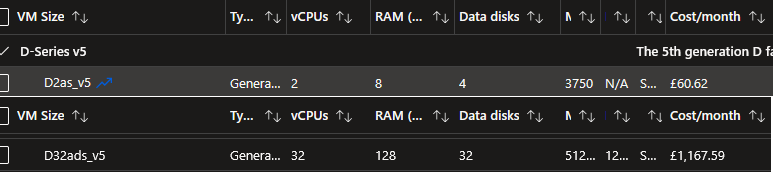
Then you have the security side of things, what if someone manually adjusted an NSG and opened an any/any rule for inbound traffic exposing the machine to the internet, that now opens the potential for data breaches, compliance issues and much more!
How to Implement Drift Detection
How you want to implement drift detection is partially dependant on how you want to report/rectify any drift that is found. The first point you will want to plan and probably implement is regular periodic checks, at least daily, if not a couple of times a day, this allows you to identify and rectify issues before it snowballs into bigger issues down the line.
Next on the list is how you want the team to be made aware of any identified issues, as lets be honest, why automate the detection if you are going to have your engineers read through the output of the pipeline runes? How you want to handle this will depend on what level of visibility you want to have and any existing processes you might have in team. The route that I would look at implementing the visibility would be for the pipeline to raise a work ticket with the relevant team using the tools that is appropriate for your team, whether that is creating a work item in Azure DevOps, an issue in GitHub or an incident/request in your ITSM tool of choice assigned to the appropriate team to fix. All of this is going on the basis that you want to implement a manual remediation as opposed to an automated one. Then to top off the visibility piece, you could utilise the data generated to power a dashboard that would show the quantity of drift reports, what areas of the infrastructure it is in, impacted resources and severity for example. This is great for a quick visibility on how bad drift is across the estate, a good data driven report for business stakeholders and a powerful tool to identify training opportunities or process gaps.
Using DevOps pipelines as an example of how to check for drift and then assign the output to a variable that can be used in later steps to implement the visibility piece would be like the following:
– task: Bash@3displayName: Terraform Drift Initializationinputs:targetType: inlinescript: |#!/bin/bashterraform init -input=falseterraform plan -input=false -detailed_exitcode -out=tfplancontinueOnError: true– task: Bash@3displayName: Terraform Drift Detectioninputs:targetType: inlinescript: |if [ “$?” -eq 2 ]; thenecho “##vso[task.setVariable variable=driftDetected]true”elseecho “##vso[task.setVariable variable=driftDetected]false”ficontinueOnError: true